We released the latest version of VNCproject with a massively redesigned and optimized timesheet section.
Time Recording in VNCproject:
In our project management tool VNCproject your team members can record their working hours in detailed tickets and thereby correlate the time spent to distinct projects and activities. This process shows transparently how much time was spent on each project or task. Within each ticket the completed work is documented for coworkers, management, controlling or for your customers in your customer projects. As a result, resources can be allocated, tasks can be assigned or work processes can be adapted if necessary. A structured and goal-oriented work environment becomes possible.
Timesheets:
Working hours of your team members are displayed in the VNCproject timesheet with a clear structure, showing the date of delivery, type of activity, corresponding project, ticket and comments. Team Manager, Project Manager, customers or the users themselves see an overview of hours worked and the exact status of their tasks. Worked hours and timesheet entries can be evaluated for a predefined period of time, for example weekly or monthly or for a certain project. Timesheets can be exported as PDF or CSV and entries can be sorted as needed, for example by date or project.
Read more about our Timesheet Module in VNCproject >HERE<
What's New?
The most important new feature is the possibility to use the timesheet directly in VNCproject for controlling purposes and the evaluation of team members. With our latest release comments can be added directly in the timesheet, worked hours can be approved or rejected (e.g. in customer projects) and controlling or management can get a fast overview about time overrun and the number of changes in logged time for any given tasks (ticket). To use the new functions most efficiently, the results of the timesheet can be grouped by issue.
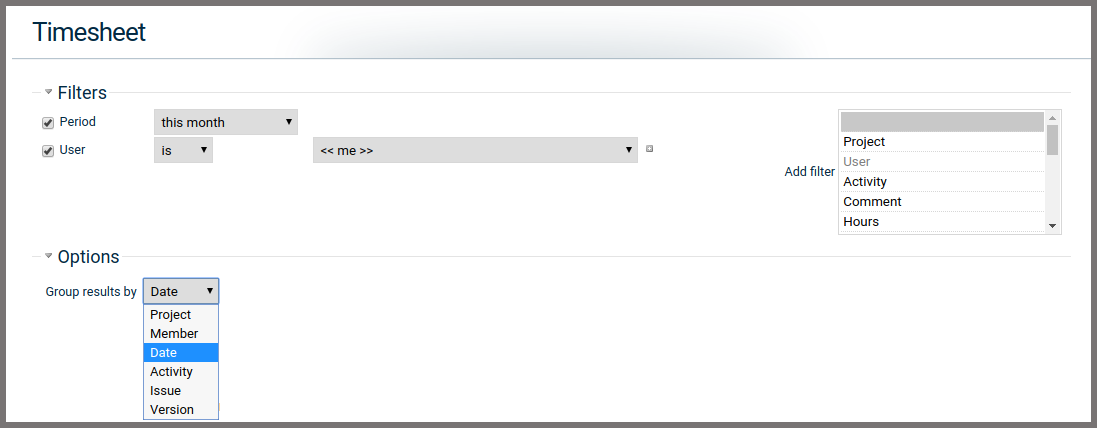
The Timesheet now includes two sections: The summary in the upper part shows the total hours of spent time, estimated time, rejected hours, time overrun hours, calculated hours for payment, approved hours for payment. A filter can be used to define a time period, e.g. one week or month. You can also use a filter to check the approve status of all tickets in a selected period.
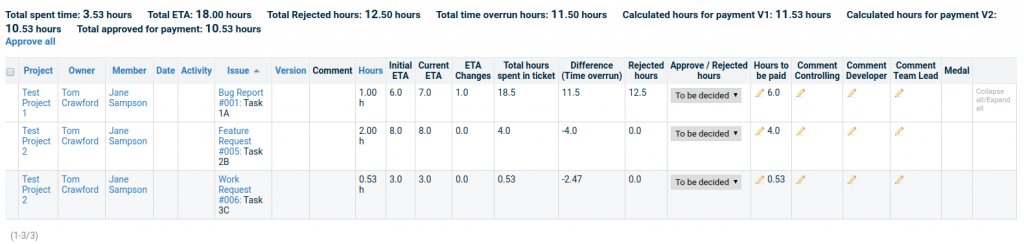
The table underneath shows the detailed time log for each ticket the team member worked on and splits into several columns:
- Project: shows the project for which the ticket (task) was created
- Owner: shows the person who created the ticket
- Member: shows the person who logged time on the ticket
- Date: shows the date of each entry. (can be shown in detail by clicking Expanse all)
- Activity: shows the activities of each entry logged (can be shown by clicking Expanse all)
- Issue: shows the type of the ticket (Bug Report, Feature Request, Change Request etc.), the Ticket number and description. The Ticket type and number is linked to the respective ticket and makes it easily accessible.
- Version: shows the roadmap/version the ticket belongs to
- Comment: shows the comments of every user per individual entry
- ETA (estimated time allocated) fields: three different columns display the initial estimated time, current estimation and the number of ETA (estimated time allocated) changes.
- Total hours: the total time spent by a user in a ticket. Here we can separate the spent time of each user based on filters.
- Rejected Hours: If the ETA is changed or time spent is significantly higher than the current ETA (creating a time overrun), these overbooked hours can be rejected in this ticket.
- Approve/Reject hours: this column shows a checkbox "Approval status": Rejected, approved, to be decided with a timestamp and quick text info about the approval (who approved and when). This option is only available if the user has the required permission (role: controller).
- Hours to be paid: this column shows the amount of hours which are suggested to be paid. By default: we subtract the rejected hours from the total amount of spent time.
- Comment columns: Controller, developers and team lead can add feedback and comments directly into the timesheet in VNCproject. It's not necessary to export the timesheet.
- Medal: After ticket closure we show the achieved medal for each ticket in the Agile Board.
We added further improvements, including the adaption of the desktop layout to the mobile version, several layout improvements and minor bug fixes.
If you are curious about VNCproject and our new timesheet module, have look at our website or write us an email to sales@vnc.biz.